


Edit Environment Variable Dialog

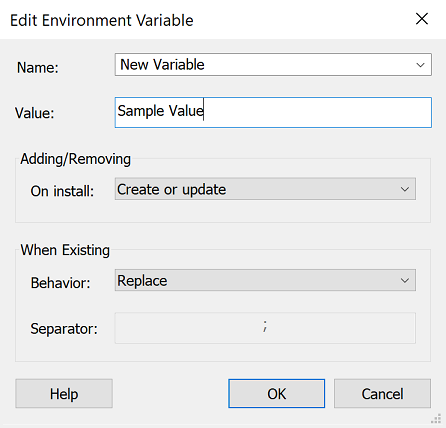
In this dialog you can edit the properties of a new environment variable or change the properties of an already existing one.
General
Name
The environment variable's name. You can localize this value.
Value
The environment variable's content. This field is of Formatted Type and can be edited using Smart Edit Control. You can localize this value.
Adding and Removing
On Install
The following operations can be performed on an environment variable when the package is installed:
- Create or update
- Create only if it doesn't exist
- Remove
When Existing
If the variable already exists on the target machine, you can choose the way in which the existing variable's content modifies:
- Replace
- Append
- Prepend
In the last two cases (append, prepend) you can choose the character that will be the separator between the existing value and new one.