


Service Failure Actions Properties

A service Failure Operation allows you to set failure actions for a service which is already installed or being installed by the current package.
Service Name
This field contains a string which represents the name of the service on which to set the failure actions. This string can be localized and it can contain installer properties. You may choose a service to be installed from the combo box or you can enter the name of a service already installed on the target machine.
Attached Component
In this field you can specify the component which will contain the failure operation. You may choose it from the drop-down list box which contains all the package's components.
Configure On
Specifies when to configure the service failure actions. The following options can be combined to represent multiple operations:
- Install - Configure during component's installation.
- Uninstall - Configure during component's uninstallation
- Reinstall - Configure during component's reinstallation
Failure Actions
In this section you can specify the actions to be taken in case the specified service fails.
- Reset failure count after - The Service Control Manager (SCM) counts the number of times each service has failed since the system was started. When the service fails for Nth time, the system performs the action with the corresponding index in "Failure Actions" list. This count will reset after the time specified in seconds.
Reboot Message
In this section you can specify a message to be sent to network users before restarting the computer in response to a "Restart the computer" action specified in the "Failure Actions" list.
- Don't send a reboot message - Check this option to delete the current message and send no message.
 To keep current message intact leave this field empty.
Run Program
In this section you can specify a program to run in response to a "Run a program" action specified in the "Failure Actions" list. Use [~] formatted string to delete the current command and run no program when the service fails. To keep using the current run program leave this field empty.
The specified change takes effect next time the system is
started.
Edit Failure Action Dialog
In this dialog, you can add a new service failure action or you can edit an existing one.
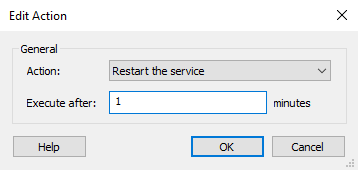
Action
The action to take in case of service failure. The available options are:
- Take no action
- Restart the service
- Restart the computer
- Run a program.
Execute after
The time to wait before performing the specified action, in minutes.
OK
Saves the action.
Cancel
Cancels the creation of a new action or discards the changes made to an existing action.