


"Child Dialogs" Dialog

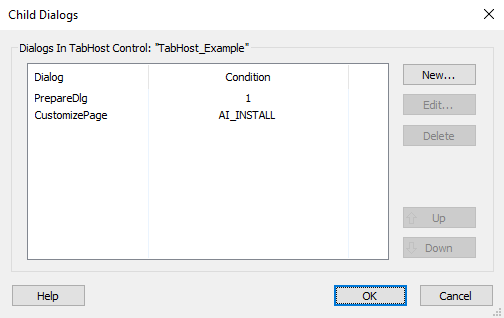
This dialog allows you to specify the child dialogs of a Tab Host control.
Adding a new child dialog
Use the button, the “New...” context menu item or press the Insert key while the list is focused. The "Edit Child Dialogs" Dialog will be displayed allowing you to add a new child dialog to the list.
Editing a child dialog
Use the button, the “Edit...” context menu item or press the Space key while a child dialog is selected. The "Edit Child Dialogs" Dialog will be displayed allowing you to edit the selected child dialog.
Deleting a child dialog
Use the button, the “Delete” context menu item or press the Delete key while a child dialog is focused.
Rearrange the child dialogs
Use the / buttons, “Up” / “Down” context menu items or press the PageUp / PageDown keys on a selected child dialog.
"Edit Child Dialogs" Dialog
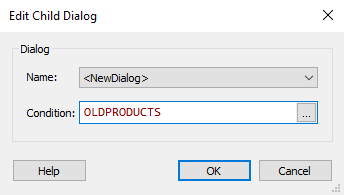
This dialog allows you to create a new child dialog. A child dialog is displayed within the Tab Host control when the user chooses its associated tab.
Name
Select the desired child dialog from the list.
 This list will be populated only with the existing "spawn-able"
unused dialogs (predefined or custom) which are supported inside a Tab
Host control. A "spawn-able" dialog does not have the "Back" / "Next"
buttons.
This list will be populated only with the existing "spawn-able"
unused dialogs (predefined or custom) which are supported inside a Tab
Host control. A "spawn-able" dialog does not have the "Back" / "Next"
buttons.
After creating a child dialog, it will be included as a Tab Host control's parent dialog child. You can reveal it by expanding the Tab Host control's parent dialog in the Install Sequence tree.
If a child dialog doesn't have its Title property defined, its name (Dialog Name property) will be used for its tab button text instead. By default a <NewDialog> will be named NewTabPageDialog in the Install Sequence tree.
Condition
Specify the visibility condition for the child dialog. Edit this field using Smart Condition Edit Control.