rmoc
Posts: 64
Joined: Tue Mar 14, 2017 8:27 pm

Prerequisites installation with quotation marks in parameter

I am referring to the test project here
ParameterWithQuotes.zip
(8.42 KiB) Downloaded 27 times
.
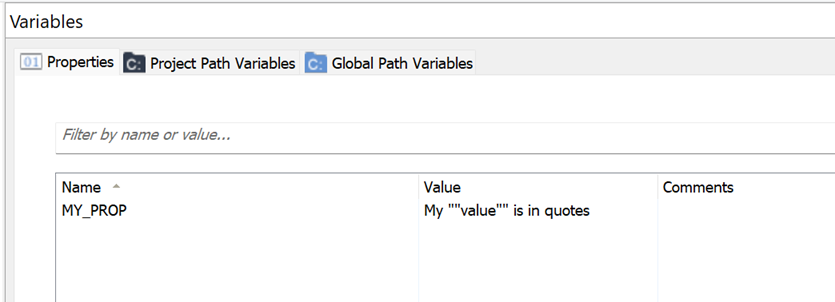
I have the problem that my parameter “MY_PROP” in MainApp contains quotation marks.
Screenshot 2026-01-06 182023.png
Screenshot 2026-01-06 182023.png (6.67 KiB) Viewed 1029 times
If I want to pass this property to SubApp as a CmdLine parameter, the remaining parameters are no longer passed correctly.
Screenshot 2026-01-06 182157.png
Screenshot 2026-01-06 182157.png (22.2 KiB) Viewed 1029 times
In this case, the silent parameter /qn is no longer evaluated and the SubApp setup starts with a full UI.

I had the same problem when passing Powershell parameters. However, the trick with passing them in single quotes '[MY_PROP]' does not work here.
Liviu
Posts: 1356
Joined: Tue Jul 13, 2021 11:29 am
Contact: Website

Re: Prerequisites installation with quotation marks in parameter

Hello,

Sorry for the delayed reply on this. Due to the Holidays, we are currently handling a high volume of support requests and are doing our best to assist everyone as quickly as possible.

If we check the installation log, we can see that the command is passed as expected:

AI_InstallPrerequisite: Installing SubApp
AI_InstallPrereq: START ProcessCmdLine
AI_InstallPrereq: START ProcessFullCmdLine
AI_InstallPrereq: mRawCmdLine=APPDIR="C:\Program Files (x86)\Your Company\MainApp\\SubApp" MY_PROP="My "value" is in quotes" /qn

This is a classic Windows command-line and MSI quoting problem.

You must double the quotes inside the property value.

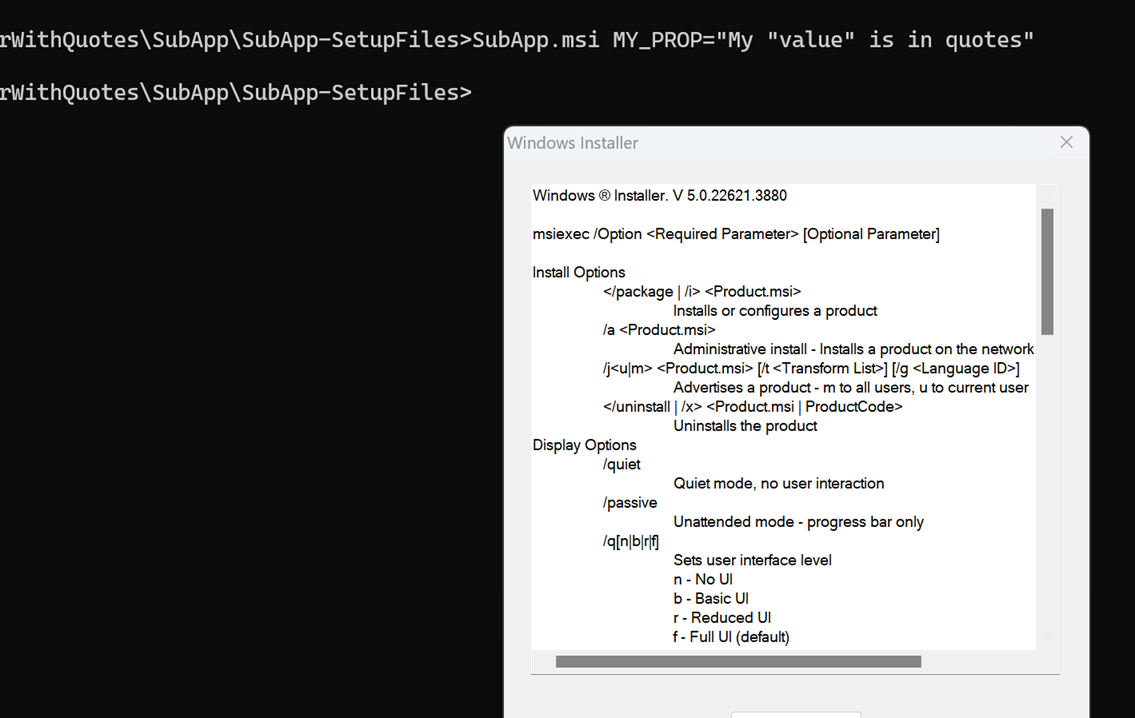
If you pass the command line directly to the prerequisite in a command prompt, like this:

SubApp.msi MY_PROP="My "value" is in quotes"

we can see that it doesn't work.
cmd.png
cmd.png (157.64 KiB) Viewed 552 times

If we double the quotes, it works as expected:

cmd2.png
cmd2.png (112.5 KiB) Viewed 552 times
double quotes.png
double quotes.png (37.67 KiB) Viewed 552 times

Hope this helps!

Best regards,
Liviu
________________________________________
Liviu Sandu - Advanced Installer Team
Follow us: Twitter - Facebook - YouTube
rmoc
Posts: 64
Joined: Tue Mar 14, 2017 8:27 pm

Re: Prerequisites installation with quotation marks in parameter

Hello Liviu

The problem is that I have no control over how users use the setup. The values for the properties can be supplied within the MSI for our setup, overwritten externally via the command line, or entered in the user interface. For me as a setup designer, this means that I want to create a way to support all scenarios. The only option I see here is that I have to know all the properties that might be used as a command line in a prerequisite and duplicate them in order to escape the quotes with a custom action before use.

I have two suggestions on how to solve the problem in AI itself.

1. Support “static/literal strings” as simple quotation marks, as is the case when using parameters for PowerShell custom actions. In my case, this would be ‘[MY_PROP]’. AI would have to recognize that this is a prerequisite command line parameter. In the background, the quotes contained would have to be replaced by double quotes and the single quotes would then have to be replaced by a quotation mark.

2. Functions when using the Properties placeholder.
In my case, for example, [Escape(MY_PROP)] or something similar. There are certainly other functions that would make working with properties much easier.

For me, treatment with the current options means investing significantly more effort.

Kind Regards
René
Liviu
Posts: 1356
Joined: Tue Jul 13, 2021 11:29 am
Contact: Website

Re: Prerequisites installation with quotation marks in parameter

Hello René,

This is how the command line works, and at the moment, we don't have predefined support for checking the value of a property and automatically escape special characters. I will forward your feedback to our development team.

To do this, you can easily create a PowerShell script to modify the property value according to your needs. Just run it before passing the property to your prerequisite.

Hope this helps!

Best regards,
Liviu
________________________________________
Liviu Sandu - Advanced Installer Team
Follow us: Twitter - Facebook - YouTube

Return to “Common Problems”