rmoc
Posts: 64
Joined: Tue Mar 14, 2017 8:27 pm

Missing properties in feature-based prerequisite installation

I need to install a feature-based prerequisite package with my main program. Some parameters, such as APPDIR, need to be passed to the package.
SubApp.png
SubApp.png (36.52 KiB) Viewed 1344 times
When I run the installation with the UI, everything works as desired. However, the installation must be performed automatically in silent mode.

In this case, the wrong or empty parameters are passed to the package.
invalidAppDir.png
invalidAppDir.png (19.58 KiB) Viewed 1344 times
Example and logfiles:
prerequisite.zip
(39.38 KiB) Downloaded 19 times
Catalin
Posts: 7606
Joined: Wed Jun 13, 2018 7:49 am

Re: Missing properties in feature-based prerequisite installation

Hello Rene,

Thank you for the provided resources.

I have managed to reproduce the issue on our end and created a ticket so that this can be fixed.

Unforunately, I wasn't able to find a workaround for this to give you until this is fixed. :(

Once this will be fixed or if I find a workaround, I'll update this thread.

Best regards,
Catalin
Catalin Gheorghe - Advanced Installer Team
Follow us: Twitter - Facebook - YouTube
rmoc
Posts: 64
Joined: Tue Mar 14, 2017 8:27 pm

Re: Missing properties in feature-based prerequisite installation

Hello Catalin

Thank you for creating the ticket. Is there any news about this ticket? Currently, this is one of the biggest problems preventing me from using AdvancedInstaller in production.

Regards
René
Catalin
Posts: 7606
Joined: Wed Jun 13, 2018 7:49 am

Re: Missing properties in feature-based prerequisite installation

Hello René,

You are always welcome!

Regarding the question, from what I can see, the issue is currently under testing so that should be it should be available in our next release (scheduled for ~Monday 19th).

If this is a pressing issue for you and want the version earlier, I can ask the dev team to make a RC version and I can send a download link for that via email, after the testing is done.

Best regards,
Catalin
Catalin Gheorghe - Advanced Installer Team
Follow us: Twitter - Facebook - YouTube
rmoc
Posts: 64
Joined: Tue Mar 14, 2017 8:27 pm

Re: Missing properties in feature-based prerequisite installation

Hello Catalin,

Thank you for your support. If possible, I would like to test the RC before January 19.

Best regards,
René
Catalin
Posts: 7606
Joined: Wed Jun 13, 2018 7:49 am

Re: Missing properties in feature-based prerequisite installation

Hello René,

You are always welcome!

I have discussed with our QA team and the RC should be available tomorrow, January 13th. :)

Once it's available, I will forward you a download link via email.

Best regards,
Catalin
Catalin Gheorghe - Advanced Installer Team
Follow us: Twitter - Facebook - YouTube
Catalin
Posts: 7606
Joined: Wed Jun 13, 2018 7:49 am

Re: Missing properties in feature-based prerequisite installation

Hello René,

As promised, I provided the download link via email.

Best regards,
Catalin
Catalin Gheorghe - Advanced Installer Team
Follow us: Twitter - Facebook - YouTube
rmoc
Posts: 64
Joined: Tue Mar 14, 2017 8:27 pm

Re: Missing properties in feature-based prerequisite installation

Hello Catalin,

Unfortunately, I am still experiencing issues with the installation of my SubApp.

I have installed the latest version and created the property SILENTPREREQSAFTERINSTALL=1.

The good news is that the SubApp files no longer simply disappear after installing an update. The problem now is that the properties are lost during an update, which means that services, for example, no longer run after an update.

I have created a test project.
TestProject.zip
(21.1 KiB) Downloaded 4 times
The batch files can be used to simulate the process.

Run1.cmd
- Create v1
- Initial installation with specification of properties
- Display of correct values in the test file that is installed with the SubApp.
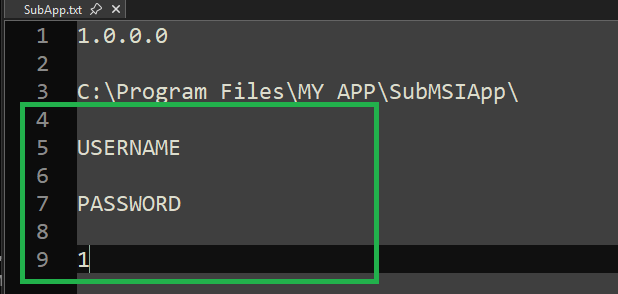
ok.png
ok.png (10.6 KiB) Viewed 192 times
Run2.cmd
- Create v1.1
- Update installation without specifying properties
- Display of incorrect values in the test file that is installed with the SubApp.
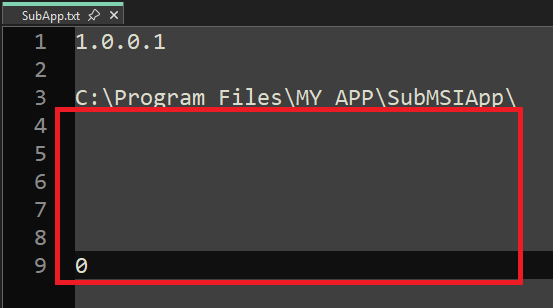
failed.png
failed.png (11.49 KiB) Viewed 192 times
It can be seen that after Run2.cmd, the properties are no longer set.

Automatic software distribution cannot currently be used in this way.

Kind regards,
René

Return to “Common Problems”